> ## Documentation Index
> Fetch the complete documentation index at: https://docs.pensiv.so/llms.txt
> Use this file to discover all available pages before exploring further.

# Working with comments

> How to attach a comment to a passage to mark what needs fixing, carry it on with replies, and resolve it once the change is in.

A remark that comes to you while revising — "this name differs from the previous chapter" — becomes one more thing to delete later if you write it into the body. A comment attaches to that passage alone, without touching the manuscript.

## Attaching a comment to a passage

Select a sentence and press **Add comment** on the inline toolbar that appears. In a document it is in the right-click menu as well. Run it without a selection and all you get is "Select text to comment on".

The **Comments** panel opens on the right, with the chosen passage quoted above an input box. Write and press **Comment**, and a mark stays on the passage. `Ctrl + Enter` (`Cmd + Enter` on Mac) posts it too, and `Esc` is **Cancel**.

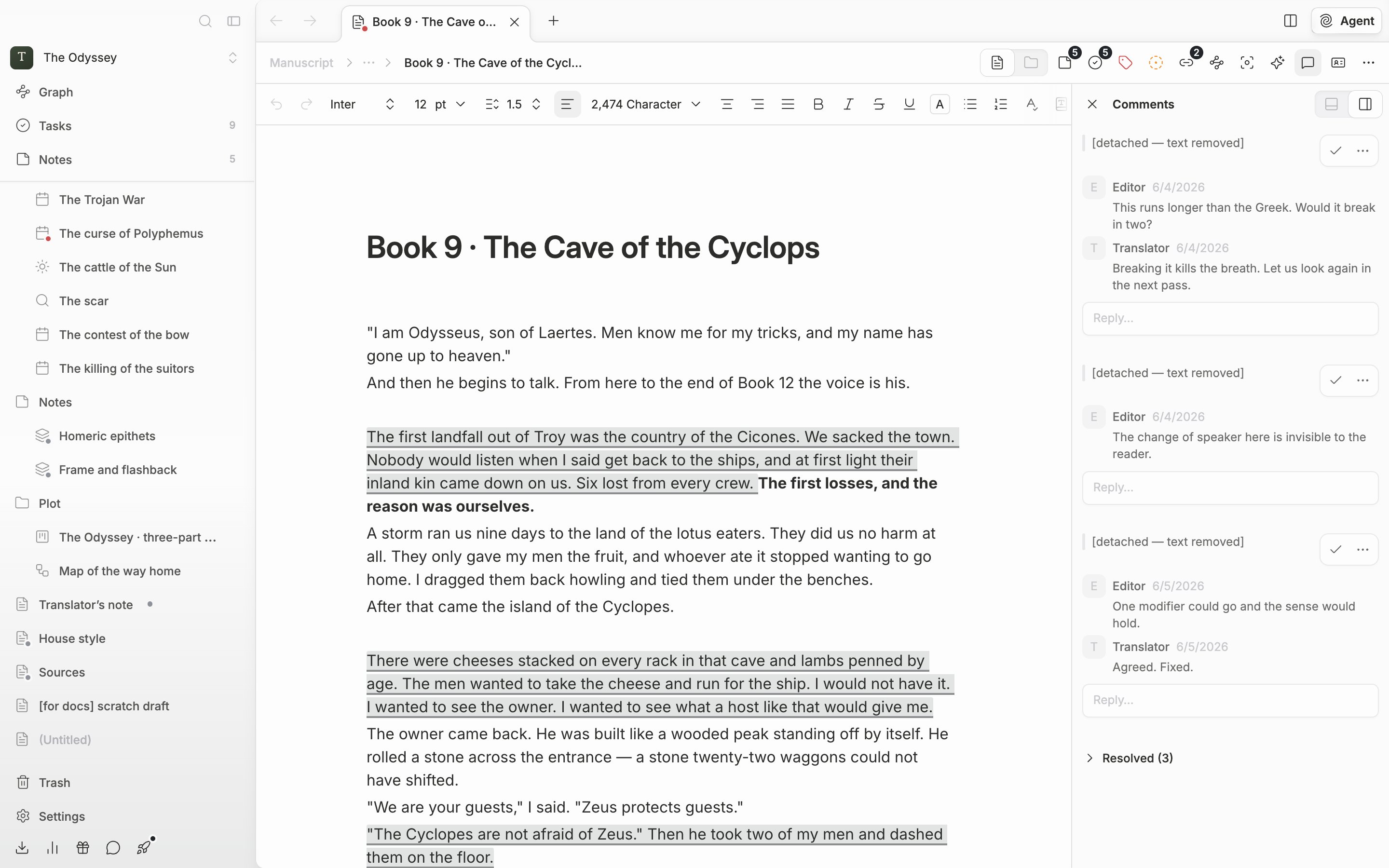
Click a marked passage and the panel moves to that comment; click a card and the view goes to that spot in the body.

<div className="app-window block dark:hidden">
  <img src="https://mintcdn.com/raumlabsinc/JcYuBBCW81V1OYpG/images/en/writing/comments--01.png?fit=max&auto=format&n=JcYuBBCW81V1OYpG&q=85&s=6782aeef41376f4aba4120f8044e9497" alt="A comment mark on one paragraph of the body, with two or three cards open in the Comments panel on the right. Each card shows the quoted passage, the author, and a relative time." width="2880" height="1800" data-path="images/en/writing/comments--01.png" />
</div>

<div className="app-window hidden dark:block">
  <img src="https://mintcdn.com/raumlabsinc/JcYuBBCW81V1OYpG/images/en/writing/comments--01-dark.png?fit=max&auto=format&n=JcYuBBCW81V1OYpG&q=85&s=7cf10db72bf45a8d62d07ca4128c27f0" alt="A comment mark on one paragraph of the body, with two or three cards open in the Comments panel on the right. Each card shows the quoted passage, the author, and a relative time." width="2880" height="1800" data-path="images/en/writing/comments--01-dark.png" />
</div>

<p className="app-caption">The mark in the body on the left and the card on the right make a pair.</p>

## Carrying it on with replies

Write in the **Reply…** field below the card and press **Reply**, and the conversation stacks up on the same passage.

**Edit** and **Delete** show only on comments you wrote. Once you edit one, **edited** appears beside the name. Delete down to the last one and the whole thread goes.

## Resolving and reopening

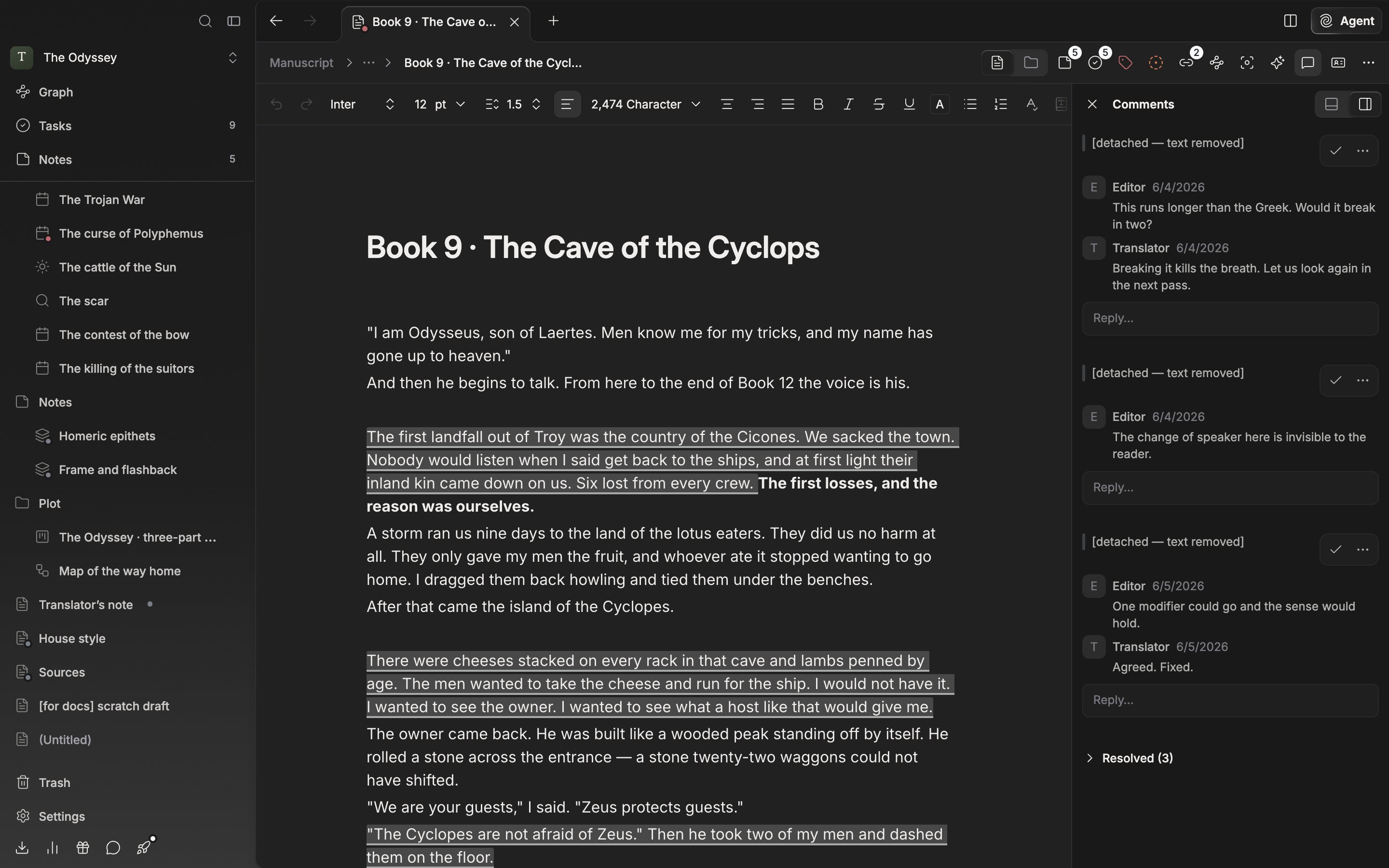
Once the change is in, press **Resolve**. The mark in the body disappears and the card folds into the **Resolved (3)** group at the bottom of the list. Expand it and press **Reopen** to bring the mark back. To keep a record, resolve rather than **Delete comment**.

## Detached comments

Delete or undo a passage that carries a comment and the card turns into a **Detached comment**, marked **\[detached — text removed]**, and drops to the bottom of the open comment list, above the resolved group. The content stays, so you can read it and then delete it.

<div className="app-window block dark:hidden">
  <img src="https://mintcdn.com/raumlabsinc/JcYuBBCW81V1OYpG/images/en/writing/comments--02.png?fit=max&auto=format&n=JcYuBBCW81V1OYpG&q=85&s=c028417c8b56f840bd3c7c9ec8fbcbab" alt="The lower part of the Comments panel. A card marked [detached — text removed] sits at the bottom of the open list, with the collapsed “Resolved (3)” group below it." width="2880" height="1800" data-path="images/en/writing/comments--02.png" />
</div>

<div className="app-window hidden dark:block">
  <img src="https://mintcdn.com/raumlabsinc/JcYuBBCW81V1OYpG/images/en/writing/comments--02-dark.png?fit=max&auto=format&n=JcYuBBCW81V1OYpG&q=85&s=9af7fa296bf6859e79f8b0db843926b3" alt="The lower part of the Comments panel. A card marked [detached — text removed] sits at the bottom of the open list, with the collapsed “Resolved (3)” group below it." width="2880" height="1800" data-path="images/en/writing/comments--02-dark.png" />
</div>

<p className="app-caption">Resolved comments and detached comments gather at the bottom of the list.</p>

Sheets work the same way, and the comment button in the header also opens and closes the panel. It cannot be used in folder view.
